> ## Documentation Index
> Fetch the complete documentation index at: https://docs.lynxssp.com/llms.txt
> Use this file to discover all available pages before exploring further.
# Private Marketplace (PMP)
This feature allows you, as a Media Owner, to create private auctions that can only be accessed by a select group of advertisers. Unlike open auctions, Private Marketplace (PMP) Deals give you complete control to sell premium inventory at a predetermined floor price.
This page helps you create a Private Marketplace (PMP) Deal on Lynx SSP.
## Accessing the Create New Deal Page
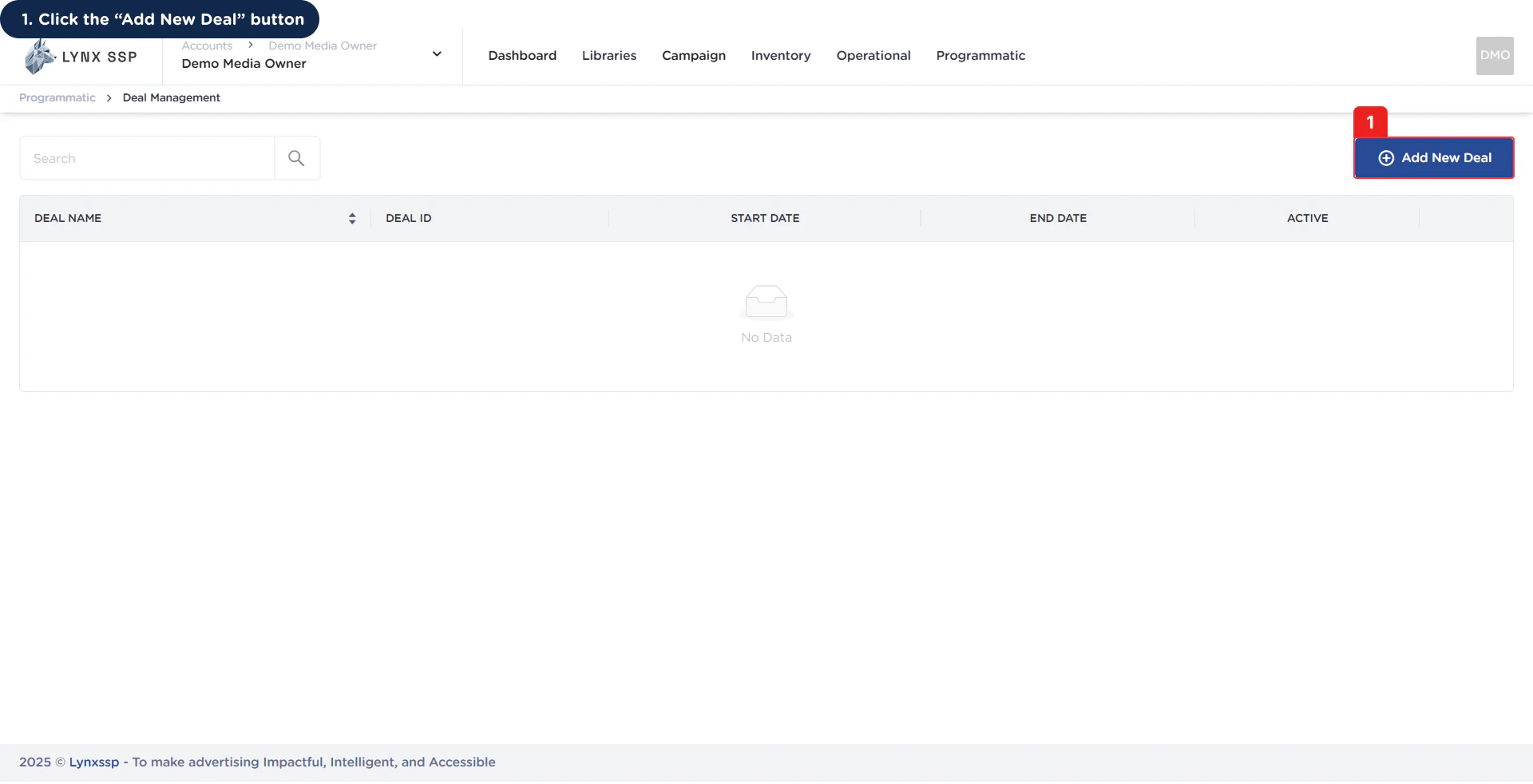 This will display the **Add New Deal Page & Form.**
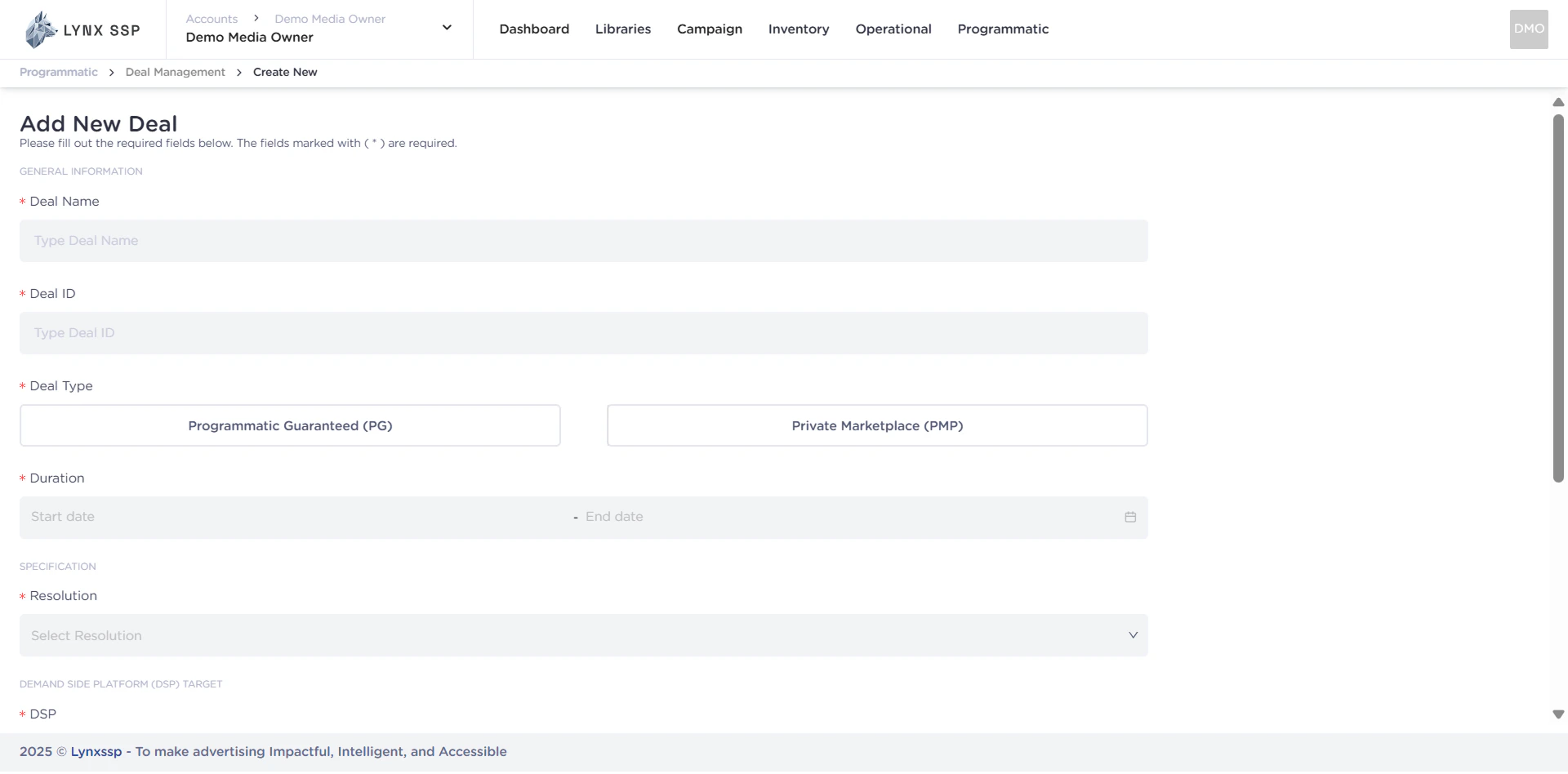 ***
## How to Create a Private Marketplace (PMP) Deal
***
## Private Marketplace (PMP) Deal Form
When creating a Private Marketplace (PMP) on the Lynx SSP Platform, you will need to prepare and enter some information or data in the following form:
***
## How to Create a Private Marketplace (PMP) Deal
***
## Private Marketplace (PMP) Deal Form
When creating a Private Marketplace (PMP) on the Lynx SSP Platform, you will need to prepare and enter some information or data in the following form:
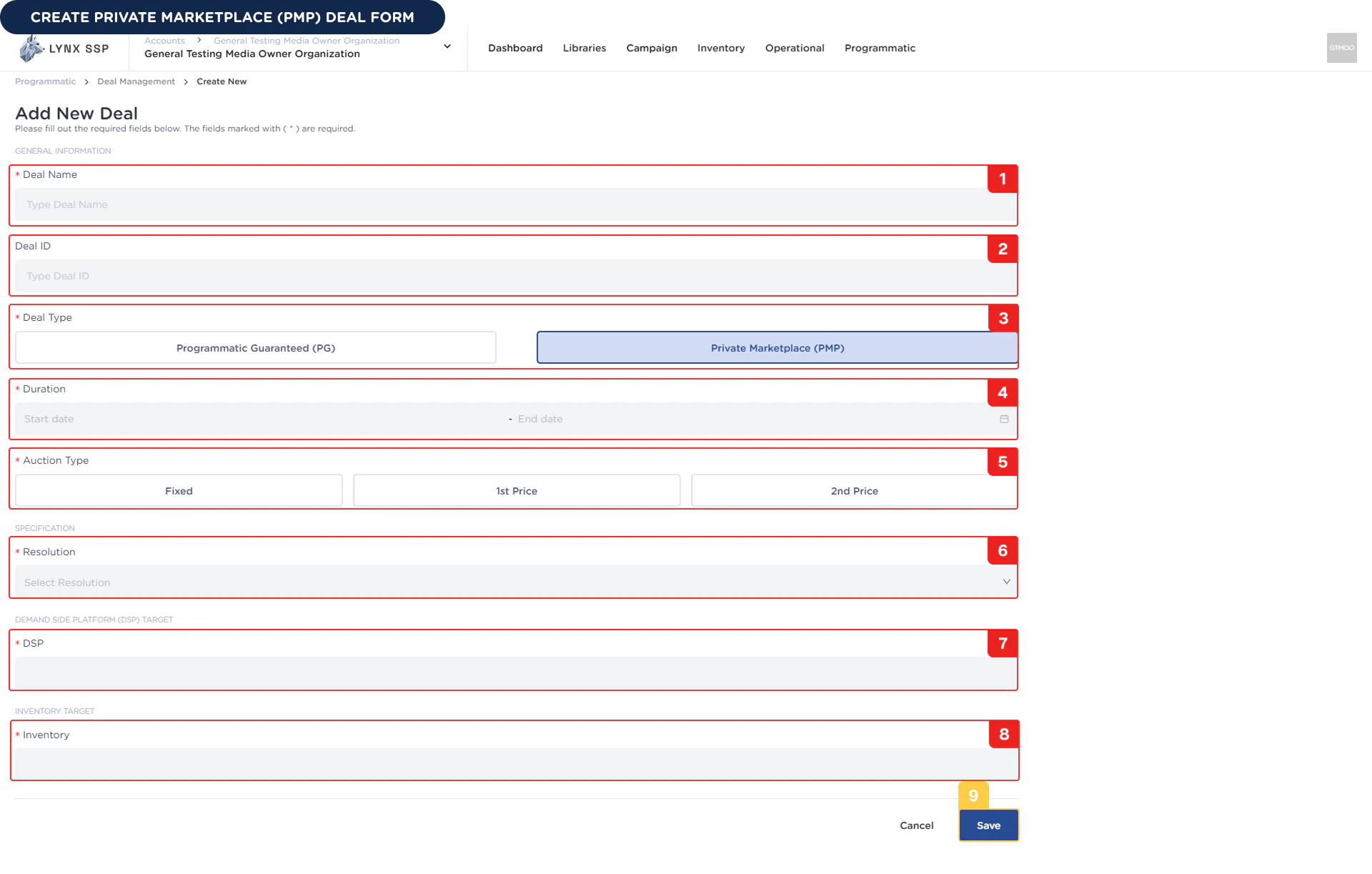 Based on the form above, the information or data required to create a new Private Marketplace (PMP) Deal is as follows:
You must enter the name of the Private Marketplace (PMP) deal you created.
**Example :** Demo Deal PMP
You can enter the Private Marketplace (PMP) deal ID that you created. We recommend using a format that suits your organization so that you can easily manage your deals.
**Example :** Demo\_Deal\_PMP
You can have a **Private Marketplace (PMP)** deal type because you will be making deals with that type.
You must select the duration or period of the Private Marketplace (PMP) deal according to your inventory selling preferences.
**Example :** 01 Desember 2025 - 31 Desember 2025 (30 Days)
You must choose the auction type or type of auction
Fixed Price is the price you set where the auction will be won by the bidder who offers the price you set.
**Example :** You set the price at \$5.
If there are 3 advertisers with the following bid values:
* Advertiser A → \$3
* Advertiser B → \$5
* Advertiser C → \$7
**So the winner is Advertiser B, who pays \$5.**
In this model, the auction winner will pay the exact price they bid. The winner is the bidder with the highest price.
**Example :**
If there are 3 advertisers with the following bid values:
* Advertiser A → \$3
* Advertiser B → \$5
* Advertiser C → \$7
**So the winner is Advertiser C, who pays \$7 because they made the highest bid.**
In this model, the winning bidder will pay a price slightly higher than the second highest bid. The winner remains the bidder with the highest price.
**Example :**
If there are 3 advertisers with the following bid values:
* Advertiser A → \$3
* Advertiser B → \$5
* Advertiser C → \$7
**So the winner is Advertiser B, who pays $7 + $0.1 = \$7.1.**
You must select the resolution of the Private Marketplace (PMP) deal you are going to create. The resolution will determine the list of inventory you can choose from, so make sure the resolution matches the inventory that will be purchased by the advertiser.
**Example :** 1920 x 1080.
You must select a DSP (Demand-Side Platform) where Private Marketplace (PMP) deals can be used by Advertisers who have previously entered into an agreement.
You can select more than one DSP for the Private Marketplace (PMP) deal you create.
**Example :** You choose **The Trade Desk**, this deal will be create only can use on the The Trade Desk Platform.
You must select the DOOH (Digital-Out-of-Home) Inventory to be used by the Private Marketplace (PMP) deal you are creating. To select DOOH (Digital-Out-of-Home) Inventory, ensure you are connected to Programmatic Settings ([See Set DOOH Inventory to Programmatic ↗](/documentation/inventory/dooh/set-to-programmatic)).
You can also select more than one Inventory.
Once you have filled out the entire Private Marketplace (PMP) deal form, you can press the **Save** button to complete it, and the Private Marketplace (PMP) deal will be successfully created.
Based on the form above, the information or data required to create a new Private Marketplace (PMP) Deal is as follows:
You must enter the name of the Private Marketplace (PMP) deal you created.
**Example :** Demo Deal PMP
You can enter the Private Marketplace (PMP) deal ID that you created. We recommend using a format that suits your organization so that you can easily manage your deals.
**Example :** Demo\_Deal\_PMP
You can have a **Private Marketplace (PMP)** deal type because you will be making deals with that type.
You must select the duration or period of the Private Marketplace (PMP) deal according to your inventory selling preferences.
**Example :** 01 Desember 2025 - 31 Desember 2025 (30 Days)
You must choose the auction type or type of auction
Fixed Price is the price you set where the auction will be won by the bidder who offers the price you set.
**Example :** You set the price at \$5.
If there are 3 advertisers with the following bid values:
* Advertiser A → \$3
* Advertiser B → \$5
* Advertiser C → \$7
**So the winner is Advertiser B, who pays \$5.**
In this model, the auction winner will pay the exact price they bid. The winner is the bidder with the highest price.
**Example :**
If there are 3 advertisers with the following bid values:
* Advertiser A → \$3
* Advertiser B → \$5
* Advertiser C → \$7
**So the winner is Advertiser C, who pays \$7 because they made the highest bid.**
In this model, the winning bidder will pay a price slightly higher than the second highest bid. The winner remains the bidder with the highest price.
**Example :**
If there are 3 advertisers with the following bid values:
* Advertiser A → \$3
* Advertiser B → \$5
* Advertiser C → \$7
**So the winner is Advertiser B, who pays $7 + $0.1 = \$7.1.**
You must select the resolution of the Private Marketplace (PMP) deal you are going to create. The resolution will determine the list of inventory you can choose from, so make sure the resolution matches the inventory that will be purchased by the advertiser.
**Example :** 1920 x 1080.
You must select a DSP (Demand-Side Platform) where Private Marketplace (PMP) deals can be used by Advertisers who have previously entered into an agreement.
You can select more than one DSP for the Private Marketplace (PMP) deal you create.
**Example :** You choose **The Trade Desk**, this deal will be create only can use on the The Trade Desk Platform.
You must select the DOOH (Digital-Out-of-Home) Inventory to be used by the Private Marketplace (PMP) deal you are creating. To select DOOH (Digital-Out-of-Home) Inventory, ensure you are connected to Programmatic Settings ([See Set DOOH Inventory to Programmatic ↗](/documentation/inventory/dooh/set-to-programmatic)).
You can also select more than one Inventory.
Once you have filled out the entire Private Marketplace (PMP) deal form, you can press the **Save** button to complete it, and the Private Marketplace (PMP) deal will be successfully created.