

How to Add Your Roadside OOH (Out-of-Home) Inventory
When adding OOH (Out-of-Home) Inventory to the Lynx SSP Platform, you will need to provide some information or data that you can prepare and enter in the following form:
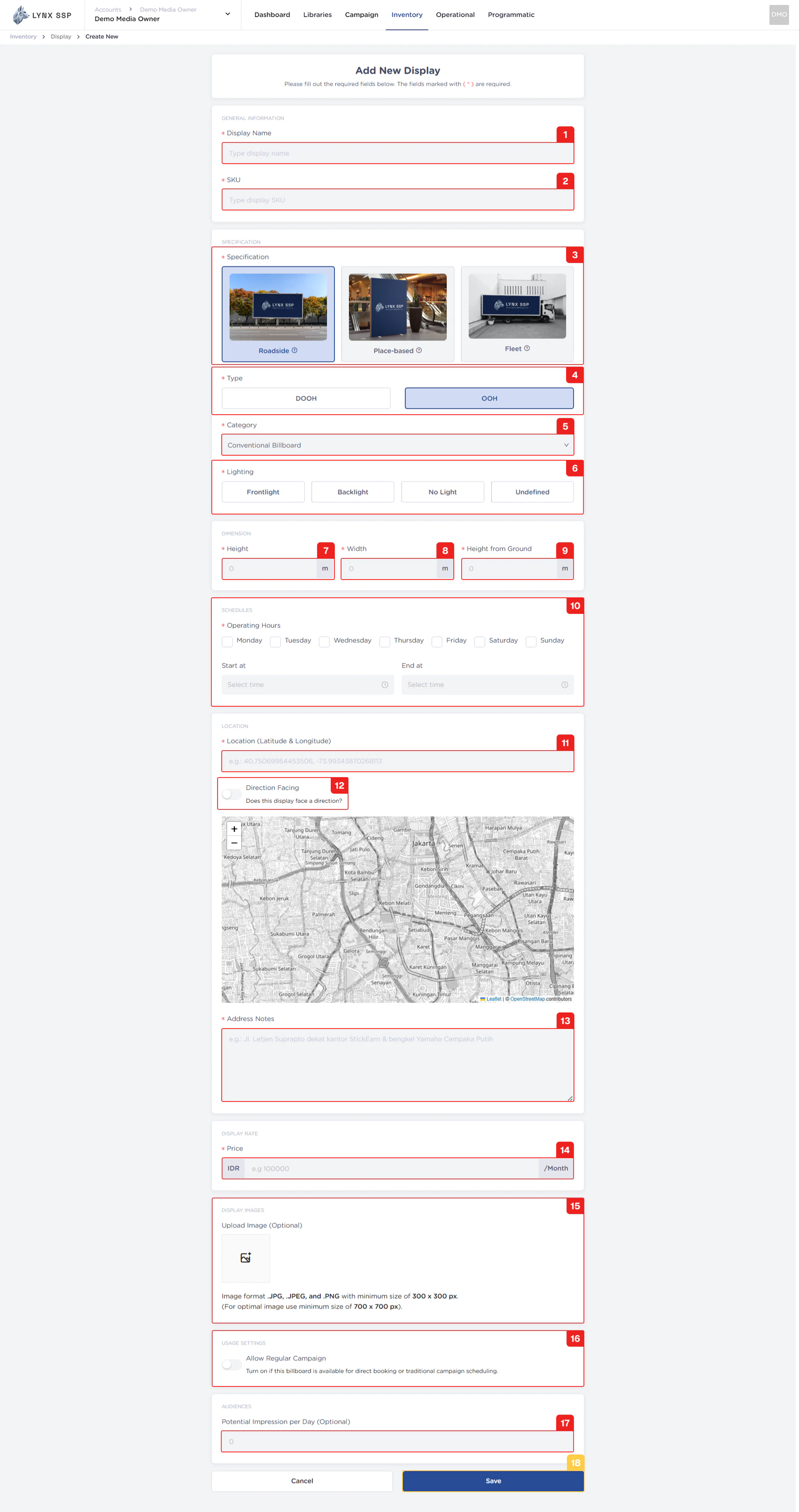
1
Display Name (Required)
You can enter the Display Name or unique name of your OOH (Out-of-Home) Inventory.
2
SKU (Required)
There are no set rules regarding SKU numbering. It all depends on your policy for determining the format and numbering of SKUs. SKUs can be used as unique parameters for performing specific searches on inventory.
The Display Name & SKU ou use cannot be duplicated. When you enter a Display Name & SKU that has been used previously and still exists in the system, the system will issue a warning that cannot be used.
3
Specification (Required)
You can choose the specifications according to the OOH (Out-of-Home) Inventory specifications that you have, Roadside (See Specification, Type & Category ↗).
4
Type (Required)
The type you selected is “OOH” because it adds OOH (Out-of-Home) Inventory.
5
Category (Required)
You must select the category according to the OOH (Out-of-Home) Inventory that you will add.
6
Lighting (Required)
When you select Conventional Billboard (OOH) as the billboard type and category, you must provide information about the type of lighting used on the billboard. The available options include:
Frontline
Frontline
The lighting position is in front and directed at the billboard media.
Backlight
Backlight
The lighting position is behind and directed at the billboard media.
No Light
No Light
Billboards do not use lighting at all.
Undefined
Undefined
Undefined
7
Height (Required)
You must enter the height of the OOH (Out-of-Home) Inventory that you are adding. The unit of measurement is meters.Example: a Conventional Billboard with specification 2.5 m x 1 m with a height of 3 m from the bottom. So entered 1 m as the height.
8
Width (Required)
You must enter the width of the OOH (Out-of-Home) Inventory that you are adding. The unit of measurement is meters.Example: a Conventional Billboard with specification 2.5 m x 1 m with a height of 3 m from the bottom. So entered 2,5 m as the width.
9
Height from Ground (Required)
You must enter the height measurement from the bottom of the OOH (Out-of-Home) Inventory that you are adding. The unit of measurement is meters.Example: a Conventional Billboard with specification 2.5 m x 1 m with a height of 3 m from the bottom. So entered 3 m as the height from ground.
10
Schedules (Operational Days and Hours) (Required)
You must select specific operating days & hours from the Roadside OOH (Out-of-Home) Inventory or billboard that you add to Lynx SSPExample: a Conventional Billboard with All Operational Days and operating hours only from 00.00 - 23.59.
11
Location (Latitude & Longitude) (Required)
You must enter the location coordinates in the form of latitude and longitude (Digital-Out-of-Home) where your inventory is located.
12
Direction Facing (Optional)
It would be better if you set the Direction Facing for your inventory. Direction Facing is information about which direction your billboard is facing. This information will be an added value for potential buyers who want to place ads on your inventory.If you have enabled Direction Facing, you must enter information about the method used and its range. You can use Custom Direction or Cardinal Direction.
Custom Direction
Custom Direction
You must enter the Latitude and Longitude information along with the Visibility Distance (in meters).
Cardinal Direction
Cardinal Direction
You choose which direction the billboard faces along with its Visibility Distance or range (in meters).
13
Address Notes (Required)
You can fill in this note with the complete address of your inventory location.
14
Price (Required)
You must enter the monthly price or rate card of the OOH (Out-of-Home) Inventory or billboard that you add to Lynx SSP.
15
Upload Display Image (Optional)
You can upload photos of OOH (Out-of-Home) Inventory or billboards that you have added to Lynx SSP.
16
Allow Regular Campaign (Optional)
You can specify or activate that your roadside OOH (Out-of-Home) Inventory is available for Regular campaign types (See Select Inventory in the Media Plan ↗).
17
Potential Impressions per day (Optional)
If you have data on how many potential impressions per day are generated from the inventory, you can fill it in this column. But if not, you can leave it blank.
18
Click the “Save” Button
After filling in all the information and adding OOH (Out-of-Home) Inventory, click the “Save” button.