

Navigation Bar
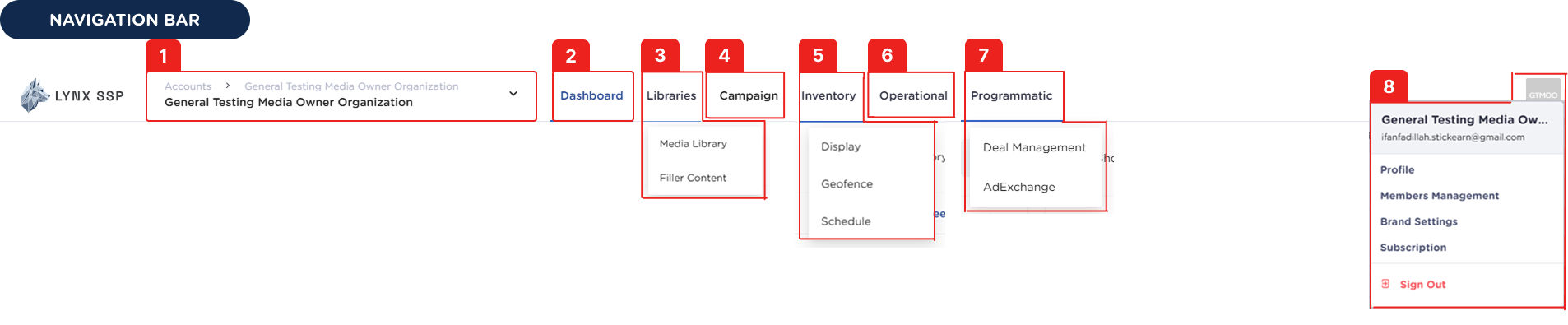 Below is an explanation of each menu available on the Navigation Bar:
Organization
Displays information about your current organization account. You can also switch to other organizations that you have access to.Dashboard
The main page of the Lynx SSP Platform contains an overview of campaign and inventory performance.Libraries
Contains Media Library and Filler Content.Media Library
Media Library
Upload and manage creatives to be used in campaigns and creative fillers (See Media Library ↗).
Filler Content
Filler Content
Create and manage filler content consisting of creatives that will be displayed to fill empty inventory slots (See Filler Content ↗).
Campaign
Plan, manage, and monitor regular campaigns for your clients (See Campaign ↗).Inventory
Provides access to Display, Geofence, and Schedule for your inventories.Display
Display
Manage and track your billboard inventory (See Inventory ↗).
Geofence
Geofence
Create geofenced areas for digital mobile LED inventories (See Geofence ↗).
Schedule
Schedule
Monitor the slot availability schedule of your digital inventories (See Schedule ↗).
Operational
Manage playlist orders or the sequence of creative content displayed on your digital inventory (See Playlist Order ↗).Programmatic
Manage programmatic campaigns, deals, ad exchange and creative approval.Deal Management
Deal Management
Create Programmatic Guaranteed (PG) & Private Marketplace (PMP) deals for advertisers on the Demand-Side Platform (DSP) (See Deal Management ↗).
Ad Exchange
Ad Exchange
Monitor the performance of the programmatic campaign deals running on your digital inventory (See Ad Exchange ↗).
Creative Approval
Creative Approval
Review and approve programmatic creatives before they are displayed (See Creative Approval ↗).
Settings
Profile
Profile
Manage your account and organization settings (See Manage Profile ↗).
Change Password
Change Password
Change your account password (See Change Password ↗).
Members Management
Members Management
View member accounts within the same organization (See Members Management ↗).
Brand Settings
Brand Settings
Create brand data related to campaigns (See Brand Settings ↗).
Sign Out
Sign Out
Log out from the Lynx SSP platform.